

While Nginx and Apache remain the most widely used web servers on the internet, two modern alternatives have gained massive popularity among developers, sysadmins, and bloggers: LiteSpeed (specifically the open-source version, OpenLiteSpeed) and Caddy.
Both servers are designed to be faster and easier to manage than legacy systems. However, they target completely different use cases and development workflows.
In this guide, we will compare OpenLiteSpeed and Caddy under the hood, analyze their configuration files, evaluate their performance (especially for WordPress), and help you decide which one to install on your VoxiHost server.
1. What is OpenLiteSpeed?
OpenLiteSpeed (OLS) is the open-source edition of LiteSpeed Web Server Enterprise. It is designed to act as a drop-in high-performance replacement for Apache, sharing many configuration concepts while delivering event-driven speeds comparable to Nginx.
OLS Key Features:
- Apache Compatibility: Understands Apache rewrite rules directly, meaning you don't need to rebuild complex configuration files.
- WebAdmin GUI: Features a built-in web-based console where you can manage virtual hosts, listeners, SSL, and security settings visually.
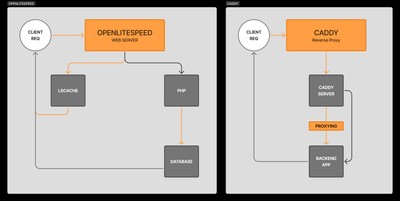
- LSCache Engine: LiteSpeed's proprietary, built-in page caching module. It is widely considered the fastest server-level cache for WordPress, Magento, and XenForo.
2. What is Caddy?
Caddy is a modern, open-source web server written in Go. Its main selling point is simplicity and security by default. It was the first web server to obtain and renew SSL/TLS certificates automatically from Let's Encrypt and ZeroSSL without requiring external tools like Certbot.
Caddy Key Features:
- Automatic SSL: Out of the box, Caddy manages the entire lifecycle of SSL certificates for all configured domains automatically.
- The Caddyfile: Caddy uses a human-readable configuration file that is incredibly short and easy to understand.
- Written in Go: Inherits memory safety and compiled performance from the Go runtime, eliminating common buffer overflow vulnerabilities.
3. Configuration Comparison: WebAdmin GUI vs Caddyfile
Configuring these two servers represents two entirely different philosophies.
Configuring OpenLiteSpeed
OLS configurations are traditionally managed via the WebAdmin GUI (listening on port 7080). While convenient for people who prefer clicking buttons over editing text files, it can make automation (like Ansible or Docker setups) slightly more complex since configuration changes are saved to separate XML/conf files.
If you want to configure redirects or rewrites, you can write Apache-style rules directly in the Virtual Host control panel.
Configuring Caddy
Caddy uses a single, centralized text file called the Caddyfile. It is incredibly clean. For example, to host a reverse proxy with automated SSL for example.com, your entire Caddyfile is just:
example.com {
    reverse_proxy localhost:3000
}
Caddy automatically detects the domain, contacts Let's Encrypt, completes the HTTP challenge, provisions the certificate, and configures an automatic HTTP to HTTPS redirect. No additional lines of configuration are needed.
4. Performance & WordPress Hosting
Performance varies drastically depending on whether you are hosting static sites, modern APIs, or PHP applications like WordPress.
WordPress Performance: OpenLiteSpeed is King
If your primary goal is to host a WordPress website, OpenLiteSpeed paired with the LSCache plugin is the absolute winner.
LSCache communicates directly with the OLS server core, allowing it to bypass PHP execution entirely for cached pages. It supports advanced optimizations like CSS/JS minification, database cleaning, and instant cache purging when a post is updated. WordPress benchmarks show LiteSpeed handling thousands of concurrent requests with sub-millisecond response times.
WordPress Caching Tip: When using OpenLiteSpeed, avoid using standard PHP-based caching plugins like WP Rocket or W3 Total Cache. The LSCache plugin is designed specifically to interface directly with the server core, which yields much higher performance and uses fewer CPU resources.
Reverse Proxy & Static Sites: Caddy Wins on Simplicity
If you are deploying a Node.js API, a Go microservice, or a static website (React, Hugo, Vue), Caddy is the superior choice. It acts as an incredibly lightweight, zero-maintenance reverse proxy. You don't have to worry about renewing certificates or writing complex redirection blocks.
5. Summary Comparison Matrix
| Feature | OpenLiteSpeed | Caddy |
|---|---|---|
| Language | C++ | Go (Memory safe) |
| Primary Admin Interface | Web GUI (Port 7080) | Text file (Caddyfile) |
| Automatic SSL | Yes (via Certbot/Acme scripts) | Yes (Natively out-of-the-box) |
| Apache Rewrite Rules | Yes (Native support) | No (Requires translation) |
| Best Use Case | PHP/WordPress hosting | Reverse Proxy, Go/Node.js, SPAs |
| Caching Engine | LSCache (Highly advanced) | Requires third-party plugins/headers |
Conclusion: Which One Fits Your VPS?
- Install OpenLiteSpeed if you are hosting a WordPress blog or e-commerce shop and want the absolute fastest load times using LiteSpeed Cache. It runs beautifully on our Premium VPS plans where SSD NVMe speeds amplify page loading performance.
- Install Caddy if you are a developer looking for a simple, modern web server with automated SSL that you can set up in 10 seconds to reverse-proxy your custom apps on a Budget VPS.
Both servers are fully compatible with VoxiHost networks and work seamlessly behind our Shield DDoS protection to keep your web services secure and fast.