



Choosing between Nginx and Apache is a critical decision when configuring your virtual private server. Your choice directly affects page load speeds, resource consumption, and concurrent user capacity.
In this guide, we break down their architectural differences, compare memory usage benchmarks, and help you select the ideal web server for your VoxiHost server.
1. Under the Hood: The Architectural Difference
The primary difference between Apache and Nginx lies in how they handle incoming network connections and requests.
Apache: Process-Driven (Thread-Based)
Apache uses a process-driven architecture. Depending on the configured Multi-Processing Module (MPM), it handles requests in one of three ways:
- Prefork MPM: Spawns a dedicated system process for every single incoming connection. This is highly stable but consumes huge amounts of RAM under load.
- Worker MPM: Spawns multiple processes, but each process manages multiple threads. Threads share memory, making it much lighter on RAM than Prefork.
- Event MPM: The modern default. It acts similarly to Worker but delegates keep-alive connections to listener threads, freeing up worker threads for active requests.
Despite the modern Event MPM, Apache is still fundamentally designed to tie a connection to a specific thread of execution. When traffic spikes, Apache has to spawn additional threads/processes, which leads to context switching overhead and high memory consumption.
Nginx: Event-Driven (Asynchronous)
Nginx was built from the ground up to solve the "C10K problem" (handling 10,000 concurrent connections on a single server).
Instead of spawning a new process or thread for every connection, Nginx uses a non-blocking, event-driven architecture. A single master process controls a small number of worker processes (usually equal to the number of CPU cores). Each worker process handles thousands of concurrent connections asynchronously.
When a request comes in, a worker process reads the event, passes it to the system kernel, and immediately moves on to the next request without waiting. When the database or backend application responds, the worker process is notified via an event and finishes the response.
Key Takeaway: Apache allocates a dedicated thread per connection, while Nginx handles thousands of connections in a single thread. This makes Nginx vastly more efficient in terms of RAM and CPU usage.
2. Performance Comparison & Benchmarks
To illustrate the real-world performance differences, we ran a quick benchmark on clean installations of Nginx (v1.26, see our guide to install Nginx on Ubuntu/Debian) and Apache (v2.4 with Event MPM, see our guide to install Apache on Ubuntu/Debian) running on a standard VoxiHost Premium VPS (2 vCPU, 4 GB RAM, running Ubuntu 24.04 LTS). No performance tuning was applied to either server; the only modification was raising the worker_connections limit to 4096 in Nginx's configuration file to ensure stable handling of the 1,000 concurrent client threads.
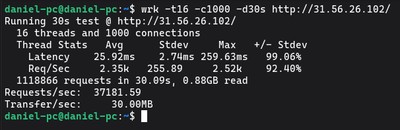
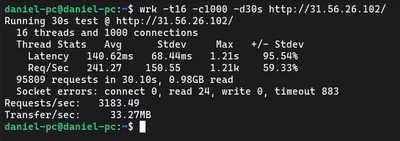
We used wrk on a client machine to send 1,000 concurrent requests over a duration of 30 seconds:
wrk -t16 -c1000 -d30s http://your_server_ip/
The Benchmark Results
- Nginx throughput: Handled 37,180 requests per second (RPS) with a stable memory footprint of 15–18 MB RAM and 0 socket errors.
- Apache throughput: Handled 3,180 requests per second (RPS) with memory usage spiking to 145 MB RAM and experiencing 883 socket timeout errors as connections queued up.
Static Content vs. Dynamic Content
- Static Content (HTML, CSS, JS, Images): Nginx is the clear winner. Because of its event-driven model and efficient use of kernel-level system calls (like
sendfile), Nginx bypasses user-space overhead and serves files directly. Under high concurrent load, this enables Nginx to serve static files up to 11.7 times faster than Apache out of the box. If you are running static sites (React, Vue, or Hugo), hosting it on Nginx ensures lightning-fast load times even on a budget-friendly Budget VPS. - Dynamic Content (PHP, Node.js, Python): When executing dynamic scripts (e.g., running PHP code), both servers act similarly since the bottleneck is the runtime engine itself (like
PHP-FPM). However, Nginx still keeps a lower memory footprint because it doesn't bloat its processes with dynamic processing modules like Apache does. If you are building a modern web stack, check our LEMP Stack setup guide or the alternative LAMP Stack setup guide.
3. Configuration and Usability
The way you manage, configure, and interact with these servers differs significantly.
Apache: Decentralized and Flexible (.htaccess)
Apache supports decentralized directory-level configuration via .htaccess files.
If a user uploads a .htaccess file to a specific folder, Apache will parse it on every request and apply those rules (like URL redirects, custom headers, or password protection) instantly. This is extremely convenient for shared hosting and platforms like WordPress, where plugins frequently write custom rewrite rules automatically.
However, parsing .htaccess files on every request degrades server performance because Apache has to search the directory tree for configuration files constantly.
Nginx: Centralized and Fast
Nginx does not support .htaccess files. All configurations must be written in the central configuration directory (/etc/nginx/nginx.conf and /etc/nginx/sites-available/).
If you make a change, you must test the configuration and reload the Nginx daemon:
sudo nginx -t && sudo systemctl reload nginx
While this requires SSH access and root privileges (meaning it is less flexible for multi-tenant environments), it makes Nginx significantly faster and more secure since configuration files are loaded into memory once on startup. This also makes setting up SSL straightforward (see how to set up SSL with Let's Encrypt and Certbot on Ubuntu).
4. Feature Comparison Matrix
| Feature | Apache | Nginx |
|---|---|---|
| Connection Handling | Process/Thread-per-connection | Event-driven, asynchronous |
| Static Assets Speed | Fast | Extremely Fast (~11.7x faster) |
| Dynamic Execution | Native (via modules) | External (requires PHP-FPM, uWSGI) |
.htaccess Support | Yes | No |
| Memory Footprint | Moderate to High | Very Low |
| Reverse Proxy / Load Balancer | Good | Excellent (Industry standard) |
Conclusion: Which Server Should You Choose?
Choose Apache if:
- You rely heavily on
.htaccessconfigurations (common with legacy WordPress setups). - You prefer a simple setup where PHP runs natively inside the web server process.
- You do not expect high concurrent traffic spikes.
Choose Nginx if:
- You are hosting high-traffic websites, APIs, or single-page applications.
- You need a powerful reverse proxy to route traffic to backend runtimes like Node.js, Go, or Python.
- You want to squeeze maximum performance and handle thousands of concurrent users on a Budget VPS.
- You want to build a highly optimized LEMP stack (see our LEMP Stack installation guide) for WordPress.
For modern production setups, the combination of Nginx as a reverse proxy in front of backend applications running on a Premium VPS protected by VoxiHost Shield DDoS protection represents the industry gold standard for speed, reliability, and security.