

Containerization has completely changed how developers build, ship, and run software. For a long time, the name Docker was synonymous with container technology. However, Red Hat introduced Podman (Pod Manager) as a direct alternative, designed to fix some of Docker's fundamental architectural and security issues.
If you are setting up a new virtual private server, you might wonder: should you stick with the industry-standard Docker, or is it time to switch to the security-focused Podman?
In this guide, we will break down the structural differences, security configurations (rootless containers), Docker Compose compatibility, and help you select the ideal engine for your VoxiHost server.
1. The Core Architecture: Daemon vs Daemonless
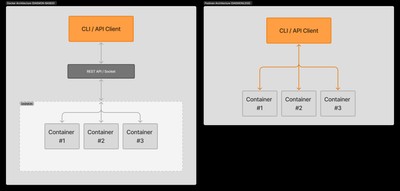
The most significant difference between Docker and Podman is how they manage container processes under the hood.
Docker: Daemon-Based Architecture
Docker relies on a central background service (daemon) called dockerd.
When you run a command like docker run, the Docker CLI client talks to the dockerd daemon via a REST API, and the daemon executes the request.
This means that if the Docker daemon crashes or needs to be restarted, all running containers on your server are temporarily affected or restarted unless live-restore is explicitly enabled. Furthermore, by default, the standard Docker daemon must run with root privileges, although since version 20.10, it can be run in rootless mode with additional configuration.
Podman: Daemonless Architecture
Podman does not use a background daemon.
When you run a command like podman run, Podman directly calls standard Linux system features (using the OCI container runtime like runc or crun) to launch and monitor the container.
This is known as a daemonless architecture. Each container runs as an independent child process of the user who started it. If Podman itself is updated or closed, the containers continue to run uninterrupted.
2. Security: The Power of Rootless Containers
Security is where Podman shines brightest. Because Docker runs as a root-level daemon, anyone with access to the Docker socket effectively has root access to the entire host operating system. If an attacker escapes a Docker container, they immediately gain control over the host.
Podman was built from the ground up to support rootless containers.
- Rootless: Podman can run, build, and manage containers without requiring root privileges or sudo access.
- User Namespaces: It utilizes Linux user namespaces to map the root user inside the container to a regular non-root user on the host VPS.
If a rootless Podman container is compromised or an attacker manages to break out of it, they are still isolated inside a standard, unprivileged user account on the host VPS, preventing them from accessing system files or other users' data.
Security Note (Docker Rootless Support): It is worth noting that since version 20.10, Docker officially supports rootless mode, and it is available "out of the box" on Ubuntu and Debian. However, setting it up still requires post-installation configuration (such as setting up user-level systemd files and
slirp4netnsnetwork drivers), whereas Podman is built with rootless operation as its primary, zero-configuration default.
3. Docker Compose & CLI Compatibility
When Podman was created, the developers wanted to make transition as painless as possible. Podman is a drop-in replacement for the Docker CLI.
Almost all commands are identical. You can even set up an alias in your shell:
alias docker=podman
What about Docker Compose?
Historically, Podman lacked support for docker-compose.yml files because Docker Compose relies heavily on communicating with the Docker daemon socket (/var/run/docker.sock).
To address this, Podman now provides:
- Podman Compose: A python-based implementation of the compose specification.
- Podman Socket Service: A systemd service that emulates the Docker socket (
podman.socket), allowing you to use the official Docker Compose binary directly.
# Enable the Podman socket for compatibility
systemctl --user enable --now podman.socket
export DOCKER_HOST="unix://$XDG_RUNTIME_DIR/podman/podman.sock"
docker-compose up -d
Compatibility Tip: While Podman's emulation socket works well for standard multi-container environments, complex setups (like Traefik or Portainer) that require direct, read-write access to
/var/run/docker.sockto dynamically read container metadata are still easier to manage and run on native Docker.
4. Systemd Integration
Because Podman doesn't have a central daemon to restart containers after a server reboot (like Docker's restart: always), it delegates process management to the host operating system's native init system: Systemd.
Podman can automatically generate systemd service files for your containers:
podman generate systemd --name my-web-app --files
This lets you manage container lifecycles just like any other Linux service:
systemctl --user enable --now container-my-web-app.service
5. Performance in Practice: Benchmarks
To move beyond theoretical differences, we ran a series of performance benchmarks on a VoxiHost Premium VPS (2 vCPU, 4 GB RAM, Ubuntu 24.04 LTS). We compared Docker Engine v26.1.0 with Podman v4.9.4 running in rootless mode. The results below are averaged across three independent test runs.
Test Results Matrix
| Metric / Test | Docker | Podman (Rootless) | Winner |
|---|---|---|---|
Image Pull Time (postgres:16 - approx. 450 MB) | 12.4 s | 11.2 s | Podman (Slight edge) |
| Image Build Time (Node.js App + NPM install) | 48.2 s | 53.6 s | Docker (Faster BuildKit caching) |
| Memory Footprint (Idle) (No containers running) | ~75 MB | ~25 MB | Podman (No background daemon) |
| Memory Footprint (50 Nginx containers) (Idle) | ~320 MB | ~460 MB | Docker (Lower overhead per container) |
Key Takeaways:
- Idle Resource Usage: Podman is the clear winner when no containers are active. Because there is no background daemon running continuously, it consumes virtually zero system resources.
- Resource Overhead at Scale: When launching 50 idle containers, Docker is more memory-efficient. In rootless mode, Podman spins up separate helper processes (
conmonfor monitoring andslirp4netnsfor user-space networking) for each container. At scale, this network and monitoring overhead scales linearly. - Build Speed: Docker's BuildKit engine remains the fastest for building images due to its highly optimized concurrent staging and aggressive caching. Podman (which uses
buildahunder the hood) is slightly slower but builds images safely inside user space without requiring root privileges.
6. Summary Feature Matrix
| Feature | Docker | Podman |
|---|---|---|
| Architecture | Daemon-based (dockerd) | Daemonless (direct OCI execution) |
| Root Privileges | Required for daemon | Optional (Fully rootless by default) |
| Pods Support | No (requires Kubernetes) | Yes (can group containers into Pods) |
| Docker Compose | Native support | Supported via socket emulation / podman-compose |
| Systemd Integration | Separate daemon configuration | Native systemd service generation |
| Security Level | Moderate (Requires hardening) | High (Default rootless isolation) |
Conclusion: Which Engine to Choose?
Choose Docker if:
- You use complex Docker Compose files with third-party tools that require direct access to
/var/run/docker.sock. - You are deploying large-scale orchestration environments (like Kubernetes) where standard Docker integrations are pre-configured.
- You want the widest community troubleshooting support.
Choose Podman if:
- Security is your top priority, and you want to run containers in a multi-tenant environment without granting root access.
- You are running isolated applications, web servers, or databases on a Premium VPS.
- You want clean, native integration with systemd services for automated startup and process monitoring.
Both runtimes are fully compatible with Budget VPS and Premium VPS hosting configurations from VoxiHost.