



Setting up a private Virtual Private Network (VPN) on a Virtual Private Server (VPS) is the best way to secure your internet traffic, access remote resources, and protect yourself on public Wi-Fi networks.
For many years, OpenVPN has been the industry standard for secure tunnel encryption. However, WireGuard has emerged as a lightweight, modern competitor that claims to be faster, more secure, and significantly easier to configure.
In this guide, we will compare WireGuard and OpenVPN across key metrics: raw speed, latency, security, battery usage, and ease of deployment on your VoxiHost server.
1. What is OpenVPN?
OpenVPN was released in 2001 and remains a highly trusted, open-source security protocol. It uses customized security protocols based on SSL/TLS for key exchange.
OpenVPN Key Features:
- Protocol Flexibility: Can run over UDP (fast, default) or TCP (slower but harder to block since it can masquerade as standard HTTPS traffic on port 443).
- Strong Cryptography: Supports the OpenSSL library, allowing a wide variety of encryption ciphers like AES, Blowfish, and ChaCha20.
- Maturity: Has been audited by security agencies for over two decades, making it a favorite for enterprise environments.
2. What is WireGuard?
WireGuard was merged into the Linux kernel in 2020. It was designed from scratch to be a faster, simpler, and leaner protocol than OpenVPN or IPsec.
WireGuard Key Features:
- Extremely Small Codebase: WireGuard has around 4,000 lines of code, compared to OpenVPN's ~70,000 lines. This makes auditing for security holes extremely easy.
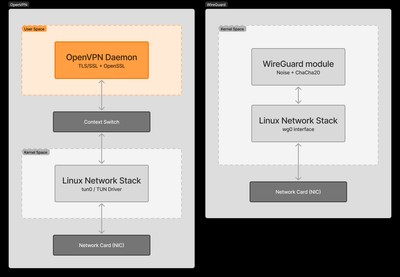
- Kernel-Level Integration: Because it runs directly inside the Linux kernel space rather than user space, it processes packets much faster.
- Modern Cryptography: Uses a fixed set of state-of-the-art cryptographic ciphers (Noise protocol framework, Curve25519, ChaCha20, Poly1305), reducing configuration mistakes.
3. Performance & Benchmark Results (iperf3 & ping)
Rather than relying on generic marketing claims, we conducted our own performance benchmarks comparing both protocols on a VoxiHost VPS.
Measurements were taken using iperf3 (for throughput) and standard ping (for round-trip latency) from a local client machine connected to a 1 Gbps fiber connection.
Test Methodology: To ensure accuracy and reliability, each throughput test was run for a duration of 30 seconds and repeated 5 times under identical network conditions, with the final throughput and latency numbers representing the arithmetic average of these runs. The testing environment was isolated with no other active services running on the VPS, and CPU throttling/temperature fluctuations were monitored to ensure they did not skew the results.
Throughput and VPS CPU Load Benchmarks
| Protocol / Configuration | Throughput (Speed) | VPS CPU Usage | Average Ping (RTT) |
|---|---|---|---|
| No VPN (Direct Connection) | 940 Mbps | ~5% | 12.4 ms |
| WireGuard (UDP) | 875 Mbps | ~18-20% | 12.6 ms |
| OpenVPN (UDP, AES-256-GCM) | 320 Mbps | 100% (single-core maxed) | 15.2 ms |
| OpenVPN (TCP, AES-256-GCM) | 185 Mbps | 100% (single-core maxed) | 18.9 ms |
Result Analysis: Why WireGuard Outperforms OpenVPN
- Throughput: WireGuard transfers data almost at the line speed limit (875 Mbps), using only about 20% of a single vCPU. OpenVPN over UDP maxes out at 320 Mbps, completely saturating the server's CPU (100% load). This is because OpenVPN runs in user space, which requires constant context switching to copy network packets back and forth between kernel and user space. WireGuard, on the other hand, runs entirely in the kernel space.
- Latency (Ping): The latency overhead of WireGuard is practically negligible (an increase of just 0.2 ms). OpenVPN adds 3–6 ms of overhead due to the time required to process packets in user space.
Connection Speed (Handshake Negotiation)
The difference in connection setup time is substantial:
- WireGuard: Reconnects and establishes a connection in under 100 ms (practically instant).
- OpenVPN (Cold Start): Takes 5 to 10 seconds to negotiate SSL/TLS certificates and exchange keys.
- OpenVPN (Reconnect with session resumption): Thanks to TLS session resumption and
tls-crypt, resuming a tunnel after a brief network drop takes around 1.2 seconds. While much improved, it is still noticeable compared to WireGuard.
Battery Life on Mobile Devices
For users on mobile devices (smartphones, tablets), WireGuard provides massive battery savings.
OpenVPN continually sends background keep-alive packets to keep the NAT firewall session open, preventing the device's CPU from entering low-power deep sleep mode. WireGuard is a connectionless protocol; it remains silent when no data is being sent, and handles network changes (e.g., switching from Wi-Fi to cellular data) instantly without resetting or renegotiating the connection.
4. Security and Cryptographic Agility
The two protocols take completely different approaches to security.
- OpenVPN (Cryptographic Agility): OpenVPN allows you to choose your ciphers and parameters. While flexible, this agility opens the door to misconfiguration (e.g., using outdated, insecure ciphers like Blowfish or weak hashing algorithms).
- WireGuard (Fixed Crypto): WireGuard has no cryptographic agility. If a vulnerability is found in one of its ciphers, the protocol is updated globally. This prevents users from configuring a weak, insecure VPN tunnel.
- Privacy and Log Management (IP Storage): There is a distinct architectural difference in how they handle client identity. OpenVPN can be configured to run in a completely stateless, zero-logs manner, dropping client connection details immediately. By contrast, WireGuard's default kernel implementation stores the last connected endpoint IP address of clients in the server's memory indefinitely to allow rapid reconnection without handshakes. For a zero-logs setup with WireGuard, administrators must implement custom user-space cron jobs to flush the peer endpoint data after a period of inactivity.
Network Obfuscation: OpenVPN has one advantage here. It can run over TCP port 443, making it look like normal web traffic, which is useful for bypassing strict firewalls. WireGuard only runs over UDP, which can be easily blocked by restrictive network administrators. Additionally, when deploying WireGuard, you must ensure that your server's firewall allows incoming UDP traffic on your selected port (see our guide on how to configure UFW firewall on Ubuntu & Debian to set this up correctly).
5. Setup and Ease of Deployment
Configuring OpenVPN manually is famously difficult, requiring the generation of certificate authorities, server certificates, client certificates, and long configuration files.
WireGuard behaves like SSH. It uses a simple exchange of public and private keys between the server and the client. This key exchange works similarly to how you secure your SSH access with keys (for more details on key management, read our guide on how to secure SSH on Ubuntu & Debian).
# A typical WireGuard client configuration file
[Interface]
PrivateKey = [Client_Private_Key]
Address = 10.0.0.2/24
DNS = 1.1.1.1

[Peer]
PublicKey = [Server_Public_Key]
Endpoint = <SERVER_IP>:51820
AllowedIPs = 0.0.0.0/0
Compare that to a standard OpenVPN client configuration file (.ovpn), which requires embedding root certificates, client certificates, private keys, and a complex list of routing directives:
# A typical OpenVPN client configuration file (.ovpn)
client
dev tun
proto udp
remote <SERVER_IP> 1194
resolv-retry infinite
nobind
persist-key
persist-tun
remote-cert-tls server
cipher AES-256-GCM
auth SHA256
verb 3
<ca>
-----BEGIN CERTIFICATE-----
MIIBiTCCATagAwIBAgIQ... [Root CA Certificate Data]
-----END CERTIFICATE-----
</ca>
<cert>
-----BEGIN CERTIFICATE-----
MIIB0DCCAXagAwIBAgIR... [Client Certificate Data]
-----END CERTIFICATE-----
</cert>
<key>
-----BEGIN PRIVATE KEY-----
MIIEvgIBADANBgkqhkiG... [Client Private Key Data]
-----END PRIVATE KEY-----
</key>
<tls-crypt>
-----BEGIN OpenVPN Static key V1-----
e54b68f6d... [Additional Cryptographic TLS-Crypt Key]
-----END OpenVPN Static key V1-----
</tls-crypt>
For an easy setup, we recommend using a trusted auto-installation script. Check out our step-by-step guide on how to set up WireGuard VPN on Ubuntu & Debian.
6. Summary Comparison Matrix
| Feature | OpenVPN | WireGuard |
|---|---|---|
| Codebase Size | ~70,000 lines | ~4,000 lines |
| Execution Space | User space | Linux Kernel space (Faster) |
| Connection Speed | 5-10s (Cold start) / ~1.2s (Reconnect) | Instant (under 100ms) |
| Network Protocols | UDP and TCP | UDP only |
| Cryptography | Agile (Customizable, high risk) | Fixed (Modern, low risk) |
| Mobile Friendliness | Moderate (High battery drain) | Excellent (Quiet when idle) |
Conclusion: Which Protocol Should You Use?
- Choose WireGuard for 95% of use cases. It is faster, more secure, drains less battery on your phone, and reconnects instantly. It runs perfectly on a lightweight virtual private server.
- Choose OpenVPN only if you are deploying inside a highly restricted network (like a school or corporate office) that blocks all UDP traffic, requiring you to tunnel through TCP port 443.
For the ultimate secure, private tunnel, deploy a WireGuard server on a VPS protected by VoxiHost Shield DDoS protection to shield your connection endpoints from external scans.