



Introduction
When deploying a new Ubuntu server, the default APT package manager configuration typically points to global mirrors. Depending on your VoxiHost server's physical location, this may cause slower download speeds during package installations and system updates.
To maximize throughput, you should configure APT to use the fastest regional mirror. This guide provides a simple script that benchmarks mirror speeds, selects the lowest-latency option, and updates your configuration (supporting both the legacy sources.list and modern ubuntu.sources formats).
Step 1: Create the Mirror Selection Script
We will use a bash script that tests the response time of various global mirrors using curl.
Create a new file named fastest-mirror.sh using your preferred text editor:
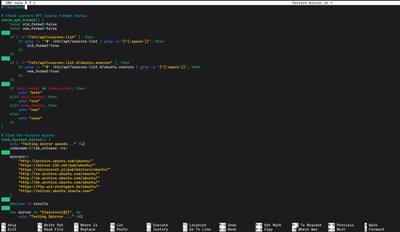
nano fastest-mirror.sh
Paste the following script into the file:
#!/bin/bash

# Check current APT source format status
check_apt_format() {
    local old_format=false
    local new_format=false

    if [ -f "/etc/apt/sources.list" ]; then
        if grep -v '^#' /etc/apt/sources.list | grep -q '[^[:space:]]'; then
            old_format=true
        fi
    fi

    if [ -f "/etc/apt/sources.list.d/ubuntu.sources" ]; then
        if grep -v '^#' /etc/apt/sources.list.d/ubuntu.sources | grep -q '[^[:space:]]'; then
            new_format=true
        fi
    fi

    if $old_format && $new_format; then
        echo "both"
    elif $old_format; then
        echo "old"
    elif $new_format; then
        echo "new"
    else
        echo "none"
    fi
}

# Find the fastest mirror
find_fastest_mirror() {
    echo "Testing mirror speeds..." >&2
    codename=$(lsb_release -cs)

    mirrors=(
        "http://archive.ubuntu.com/ubuntu/"
        "https://mirror.i3d.net/pub/ubuntu/"
        "https://mirroronet.pl/pub/mirrors/ubuntu/"
        "http://us.archive.ubuntu.com/ubuntu/"
        "http://uk.archive.ubuntu.com/ubuntu/"
        "http://de.archive.ubuntu.com/ubuntu/"
        "https://ftp.uni-stuttgart.de/ubuntu/"
        "https://mirror.ubuntu.ikoula.com/"
    )

    declare -A results

    for mirror in "${mirrors[@]}"; do
        echo "Testing $mirror ..." >&2
        response="$(curl -o /dev/null -s -w "%{http_code} %{time_total}\n" \
                  --connect-timeout 2 --max-time 3 "${mirror}dists/${codename}/Release")"

        http_code=$(echo "$response" | awk '{print $1}')
        time_total=$(echo "$response" | awk '{print $2}')

        if [ "$http_code" -eq 200 ]; then
            results["$mirror"]="$time_total"
        else
            results["$mirror"]="9999"
        fi
    done

    sorted_mirrors="$(
        for url in "${!results[@]}"; do
            echo "$url ${results[$url]}"
        done | sort -k2 -n
    )"

    fastest_mirror="$(echo "$sorted_mirrors" | head -n 1 | awk '{print $1}')"

    if [[ "$fastest_mirror" == "" || "${results[$fastest_mirror]}" == "9999" ]]; then
        fastest_mirror="http://archive.ubuntu.com/ubuntu/"
    fi

    echo "$fastest_mirror"
}

# Generate new format source list
generate_new_format() {
    local mirror="$1"
    local codename="$2"

    echo "Generating new format source list /etc/apt/sources.list.d/ubuntu.sources"

    sudo tee /etc/apt/sources.list.d/ubuntu.sources >/dev/null <<EOF
Types: deb
URIs: $mirror
Suites: $codename $codename-updates $codename-backports $codename-security
Components: main restricted universe multiverse
Signed-By: /usr/share/keyrings/ubuntu-archive-keyring.gpg
EOF
}

# Generate old format source list
generate_old_format() {
    local mirror="$1"
    local codename="$2"

    echo "Generating old format source list /etc/apt/sources.list"

    sudo tee /etc/apt/sources.list >/dev/null <<EOF
deb $mirror $codename main restricted universe multiverse
deb $mirror $codename-updates main restricted universe multiverse
deb $mirror $codename-backports main restricted universe multiverse
deb $mirror $codename-security main restricted universe multiverse
EOF
}

main() {
    sudo apt update
    sudo apt install -y curl lsb-release

    format=$(check_apt_format)
    codename=$(lsb_release -cs)

    fastest_mirror=$(find_fastest_mirror)
    echo "Fastest mirror found: $fastest_mirror"

    case "$format" in
        "old"|"none")
            generate_old_format "$fastest_mirror" "$codename"
            ;;
        "new"|"both")
            if [ "$format" == "both" ]; then
                sudo mv /etc/apt/sources.list /etc/apt/sources.list.bak
            fi
            generate_new_format "$fastest_mirror" "$codename"
            ;;
    esac

    sudo apt update
    echo "APT source optimization completed!"
}

main
Note: The mirror list in this script is focused on major European and US mirrors (ideal for Premium VPS locations). You can easily add more regional URLs to the
mirrorsarray if your server is located elsewhere.
Step 2: Make the Script Executable
Save and close the file, then grant the script execute permissions:

chmod +x fastest-mirror.sh
Step 3: Run the Script
Run the script to test the mirrors. It will install curl and lsb-release if necessary, analyze latencies, and write the new config in the appropriate format for your Ubuntu version.
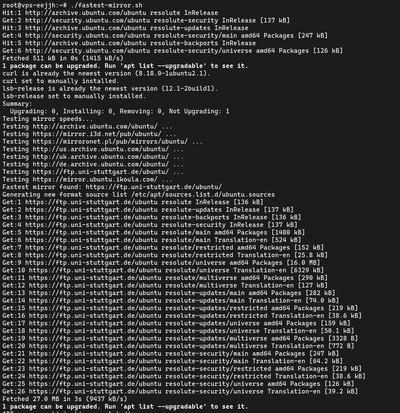
./fastest-mirror.sh
You should see output similar to this:
Testing mirror speeds...
Testing http://archive.ubuntu.com/ubuntu/ ...
Testing https://mirroronet.pl/pub/mirrors/ubuntu/ ...
Fastest mirror found: https://mirroronet.pl/pub/mirrors/ubuntu/
Generating new format source list /etc/apt/sources.list.d/ubuntu.sources
Hit:1 https://mirroronet.pl/pub/mirrors/ubuntu noble InRelease
...
APT source optimization completed!

Conclusion
Your server is now configured to fetch packages from the fastest available regional mirror, drastically reducing the time it takes to install software and apply security updates.
Looking for high-performance hosting in Europe? Deploy a VoxiHost Budget VPS today and experience the speed of NVMe storage combined with optimal network routing.