


At VoxiHost, network security has always been a core foundation, meaning every VPS we host is protected automatically from day one by our two-layer VoxiShield protection. Today, we are taking a massive leap forward by putting that power directly into your hands.
We are thrilled to announce the official release of the VoxiShield DDoS Protection & Smart Firewall management panel inside the VoxiHost dashboard! You are no longer restricted to default background filtering; you can now customize, monitor, and define your network security policies in real-time.
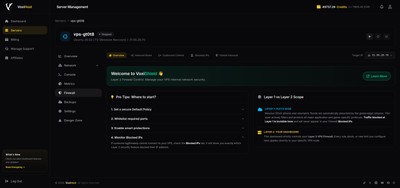
The Two-Layer Mitigation Pipeline
Traditional firewalls operate directly on the server operating system, consuming precious CPU and RAM resources during a network attack. VoxiShield filters malicious traffic in a progressive, off-loaded pipeline before it ever reaches your virtual machine.
Layer 01: PletX Edge (Volumetric Filtering)
All incoming global traffic first passes through the PletX Edge scrubbing network. This layer is unmanaged and operates 100% automatically. It acts as a massive shield, soaking up volumetric DDoS floods (like DNS/NTP amplification or UDP floods) up to 4+ Tbit/s so that your server's bandwidth remains completely untouched.
Layer 02: Core Firewall (Dashboard Managed)
Once volumetric threats are neutralized, traffic reaches our transparent Core Firewall. This is the layer you control. Directly from the VoxiHost dashboard, you can define custom traffic access rules, manage ports, configure rate limits, and block malicious traffic with sub-second propagation.
Powerful Firewall Features at Your Fingertips
We designed VoxiShield to replace complex iptables and nftables commands with an intuitive, visual control center. You do not need to be a network administrator to secure your VPS.
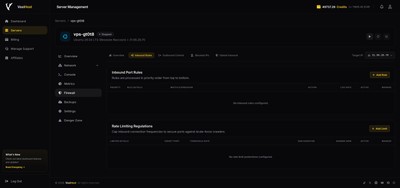
1. Inbound Rules & Rate Limiting
Control exactly who and what can connect to your applications. With our Inbound Rules panel, you can:
- Open specific ports or custom port ranges.
- Restrict protocols to TCP, UDP, or both.
- Define custom actions (Allow / Drop) for each rule.
- Apply precise packet-per-second (PPS) limits to protect game servers and applications from connection floods.
2. Egress Security (Outbound Control)
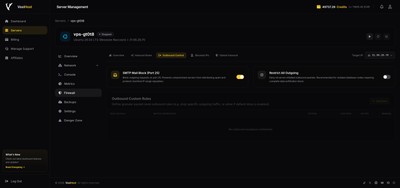
Keep your server's IP address clean and reputable. Outbound traffic control allows you to monitor and limit egress data, preventing a compromised application from scanning the internet or joining botnets.
- Default Port 25 (SMTP) Block to prevent your VPS from sending spam emails.
- Outbound custom port whitelist controls to restrict egress traffic to verified services.
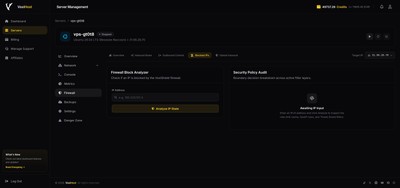
3. Block Analyzer
Diagnosing network issues is now effortless. If a legitimate user or external service is having trouble connecting, you can instantly query their IP address in the Block Analyzer.
- Verify if an IP is flagged by Global Inbound filters (such as GeoIP or ASN blocks).
- Check if the IP is temporarily rate-limited due to exceeding your PPS rules.
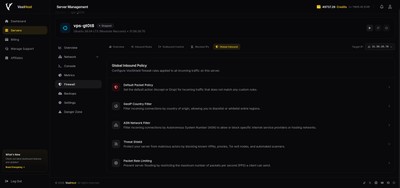
4. Global Inbound Filters
Block whole vectors of malicious traffic before they even reach your server's network card:
- GeoIP Country Filter: Allow or block traffic from specific countries.
- ASN Network Filter: Block entire hosting providers, VPN networks, or ISPs.
- Threat Shield Intelligence: Automatically block known malicious botnets, scanners, and exploit sources updated daily.
Dedicated Game & Protocol Protection
Different services require different filtering rules. A website running on HTTPS needs web-specific scrubbing, while a Minecraft or Counter-Strike server requires low-latency UDP filtering.
VoxiShield includes dedicated, automatically deployed scrubbing templates tailored for the most popular games and protocols. These templates adapt in real-time to mitigate zero-day exploits and keep your latencies stable.
Special Launch Promotion: -35% OFF
To celebrate the release of the VoxiShield management interface, we are offering an exclusive discount on all our VPS hosting services. Protect your next project with built-in enterprise security at an unbeatable price!
Use promo code VOXISHIELD at checkout to receive 35% OFF your monthly billing cycle.
Promo Details: This code is valid for all monthly plans until July 10, 2026.
Next Steps
With VoxiShield, enterprise-grade security is a standard, not a luxury. No surprise bills, no hidden bandwidth limits; only raw, high-performance protection that grows with your needs.
Ready to secure your infrastructure? Deploy a new Budget VPS or high-performance Premium VPS today, and manage your network policies through the VoxiShield Smart Firewall interface inside the VoxiHost dashboard right away!